
Contributions
The Best AI Video Generators for Digital Creators


The AI video landscape has shifted from experimental novelties to professional-grade tools. I have spent weeks testing the top platforms to find the best AI video generators that actually deliver ROI for creators and developers.
Selecting the right tool is no longer just about who has the flashiest demo. It is about workflow efficiency, API stability, and output reliability. I guarantee at least one of these tools will meet your needs, whether you are building a startup or scaling a content agency.
Quick Comparison: Top AI Video Tools at a Glance
| Tool | Primary Use Case | Modalities | Platform | Free Plan |
|---|---|---|---|---|
| Magic Hour | All-in-one Video Workflow | Video-to-Video, Face Swap, Animation | Desktop & Mobile | Yes (Generous) |
| Runway Gen-3 | High-end Cinematic Visuals | Text-to-Video, Image-to-Video | Desktop | Limited |
| Luma Dream Machine | Realistic Physics & Motion | Text-to-Video | Desktop | 30 Gens/Mo |
| HeyGen | Corporate Avatars & Training | Talking Head | Desktop | 1 Credit |
| Kling AI | Long-form Narrative Video | Text-to-Video | Desktop & Mobile | Daily Credits |
- Magic Hour: The Ultimate All-in-One Creative Engine
After extensive testing, Magic Hour stands out as the most versatile platform for serious creators. While many tools focus on a single niche, Magic Hour provides a unified workspace that handles everything from high-fidelity animation to complex multi-step workflows.
What makes it unique is the “click-to-create” philosophy. You don’t need to be a prompt engineer to get professional results. Their one-click multi-step workflows allow you to generate a base video, upscale it for 4K delivery, and refine the motion all in one sequence. For those working on social media content, the AI video face swap tool provides seamless character replacement that maintains lighting and expressions perfectly.
Key Differentiators:
- Frontier Model Access: It aggregates the best underlying AI models in one interface.
- No Concurrency Caps: You can run parallel generations without waiting for one to finish.
- Founder-Level Support: The responsiveness to technical queries is unmatched in the industry.
- Full API Parity: Developers can access every tool via API just as easily as the UI.
Pros:
- Industry-leading lip sync and talking photo realism.
- No signup required to try the initial features.
- Credits never expire—you keep what you pay for.
- Weekly feature releases keep the platform at the bleeding edge.
- Optimized perfectly for both desktop and mobile browsers.
Cons:
- The sheer number of tools can be a lot for a first-time user to explore.
- Highly stylized “anime” outputs require more specific prompting than realistic ones.
Evaluation:
If you are looking for a platform that delivers a complete video production suite without the friction of multiple subscriptions, Magic Hour is hard to beat. I found that creating a Magic Hour talking photo was significantly faster and more stable than using standalone open-source alternatives, making it ideal for rapid content scaling.
Pricing:
- Free: Available to get started.
- Creator: $15/month (or $10/month billed annually).
- Pro: $39/month for higher volume and advanced features.
- Full details: Magic Hour Pricing
- Runway (Gen-3 Alpha)
Runway remains a titan in the space, particularly for those who need cinematic control. Their Gen-3 Alpha model has set a high bar for texture and lighting. It is a “director’s tool,” offering features like Motion Brush that allow you to paint specific areas of an image to animate them.
Pros:
- Exceptional control over camera movement and lighting.
- Professional-grade video editing suite built into the browser.
- Strong community and extensive tutorial library.
Cons:
- The pricing can get expensive quickly for high-resolution exports.
- Steeper learning curve compared to template-based tools.
Evaluation:
Runway is the gold standard for visual effects artists who want to push the boundaries of AI cinematography. I found it most useful when I had a very specific visual “vibe” in mind that required manual tweaking.
Pricing:
- Standard: $15/month.
- Pro: $35/month.
- Luma Dream Machine
Luma AI entered the video market with a focus on physical realism. Their Dream Machine model excels at maintaining consistent object geometry—meaning people don’t grow extra limbs as often as they do in other models. It is fast, efficient, and great for generating 5-second clips that look like real b-roll.
Pros:
- Very high consistency in character movement.
- Rapid generation times (usually under 120 seconds).
- Great at interpreting complex prompts.
Cons:
- Limited built-in editing tools compared to Magic Hour or Runway.
- Can struggle with extremely fast, chaotic motion.
Evaluation:
Luma is my go-to for “stock footage” replacement. If I need a shot of a cat drinking milk in a sunny kitchen, Luma generates it with near-perfect realism on the first try.
Pricing:
- Free: 30 generations per month.
- Standard: $29/month.
- HeyGen
If your goal is digital content creation for business—specifically “talking head” videos—HeyGen is the market leader. It allows you to create a digital twin of yourself that can speak dozens of languages with perfect lip-syncing. This is a game-changer for localized marketing and internal training.
Pros:
- Incredible voice cloning and lip-sync accuracy.
- Large library of diverse avatars for those who don’t want to be on camera.
- Zapier integration for automated video workflows.
Cons:
- Very expensive for long-form content.
- Strictly focused on talking heads; not useful for creative b-roll or stylization.
Evaluation:
HeyGen is a specialized tool. I use it strictly for educational content where a human face is necessary to build trust. It saves hours of filming time for repetitive scripts.
Pricing:
- Creator: $29/month.
- Team: $149/month.
- Kling AI
Kling has gained popularity for its ability to generate longer clips (up to 10 seconds initially, with extensions). It handles human movement, like eating or walking, with a level of fluidity that many Western models are still chasing. It is particularly strong in the mobile app space.
Pros:
- Excellent depiction of human-object interaction.
- Supports longer video durations than most competitors.
- Advanced “Director Mode” for precise camera control.
Cons:
- The web interface can feel a bit cluttered.
- Pricing tiers are somewhat rigid for small-scale users.
Evaluation:
I tested Kling for a short narrative project and was impressed by its ability to maintain a character’s appearance across multiple takes. It is a strong contender for creators making AI-short films.
Pricing:
- Basic: ~$10/month.
- Pro: ~$37/month.
How I Chose These Tools: Methodology
I evaluated these platforms based on four primary pillars:
- Output Quality: I looked for temporal consistency (lack of flickering) and high-fidelity textures.
- Workflow Efficiency: A tool is only as good as the time it saves. I prioritized platforms like Magic Hour that offer one-click solutions over those that require hours of “prompt engineering.”
- Pricing Value: I compared the cost per generation and whether the credits carried over or expired.
- Reliability: I tested how these platforms handled high-traffic periods and whether their APIs remained stable under load.
My testing involved generating the same three prompts (a cinematic landscape, a talking human, and a stylized animation) across all platforms to compare the results side-by-side.
The Market Landscape and Trends
The trend in 2025 is clearly moving toward multi-model aggregation. Instead of companies trying to build one model that does everything, they are building platforms that allow users to toggle between specialized models.
We are also seeing a shift toward “Video-to-Video” workflows. Creators are no longer just typing text; they are filming a rough sketch on their phone and using AI to “skin” it into a professional animation. This “human-in-the-loop” approach results in much higher quality than pure text-to-video.
Final Takeaway: Which Tool Should You Use?
- For the “Power User” and All-in-One Creator: Magic Hour is the best choice. Its combination of face swap, lip sync, and multi-step workflows makes it the most practical daily driver.
- For Cinematic Visuals: Choose Runway.
- For Business Presentations: Use HeyGen.
- For Realistic Physics: Go with Luma Dream Machine.
The best way to decide is to take advantage of the free tiers. Most of these tools, especially Magic Hour, allow you to see the quality of the output before committing to a monthly spend.
Frequently Asked Questions
Q: Do I need a powerful computer to run AI video generators?
A: No. All the tools listed here are cloud-based. The heavy lifting is done on their servers, meaning you can even generate 4K video from a basic smartphone or laptop.
Q: Can I use these videos for commercial purposes?
A: Generally, yes, if you are on a paid plan. Most platforms grant full commercial rights to subscribers, but always check the specific terms of service for the tool you choose.
Q: How long does it take to generate an AI video?
A: It varies by tool. A 5-second clip typically takes between 60 seconds and 3 minutes. Magic Hour allows for parallel generations, so you can start ten videos at once to save time.
Q: Which tool is best for social media creators (TikTok /Reels)?
A: Magic Hour is highly optimized for this. Its mobile-friendly interface and “Video-to-Video” features allow you to transform phone footage into high-end viral content instantly.




6 Phone Numbers to Call for Music That Still Work (Tested 2026)
In an age of instant streaming on Spotify and Apple Music, the idea of looking for phone numbers to call...


The Ultimate Guide to Modern Bathroom Renovations
The bathroom is no more a simple functional area monitored somewhere in the corner of the house, it has become...


Custom Blinds in Canada: Fit, Finish, and Daily Function
A home is often defined by its windows – the portals that connect our private sanctuaries with the outside world....


Homeowner’s Guide: Practical Tips for Preventing Costly Roof Damage
A home’s roof often sits out of sight and out of mind, so trouble tends to build quietly. Signs appear...


How to Spruce Up Your Home’s Exterior Before Decorating it?
Holiday decorating is always more fun when the stage is set, and nothing sets that stage better than a refreshed...


When Preparedness Becomes a Homeowner’s Best Asset?
What do you do when something at home breaks at the worst possible time? Maybe it’s a leaky roof during...


From Repairs to Renovations: How to Keep Your Home in Top Shape?
Keeping a place in great shape requires attention, time, and smart planning. Small fixes often grow into bigger projects if...


The Most Overlooked Structural Issues in Older Homes
Older homes often carry a charm that newer properties cannot replicate. They offer character, history, and distinctive design. Yet many...


More Than a Change of Address: How to Feel at Home in a New City
Ever unpacked a box of dishes and suddenly felt like a stranger in your own life? It happens. You move...


The Steps That Make Transitioning Into a New Home More Manageable
Moving into a new home feels exciting, yet many people find the process stressful when tasks pile up unexpectedly. A...


How to Tell If Your Water Heater Is Costing You More Than It Should?
If you live in St. Charles, you’ve probably seen your utility bills rise over the past few seasons — even...


Small Space Styling Ideas Featuring the Globule Gold Leafing Console
Small interiors demand furnishings that deliver both style and function without overwhelming the room. The Globule Gold Leafing Console offers...


Budget-Friendly Ways to Modernize an Older Home
If you live in Boulder, you probably know how charming older homes can be. Many of them have character, personality,...


From Cleanup to Care: A Homeowner’s Guide to Storm Recover
Storms can leave families dealing with damaged walls, soaked flooring, and scattered debris. In Northeast Georgia, where strong weather can...


What Are Design Trends That Elevate Homes from Ordinary to Exceptional?
Ever walked into a home that just felt special? It might have been the layout, the lighting, or even the...


Can’t Beat the Chill at Home? Here’s What Might Be Going Wrong
When winter sets in, it often exposes problems in your home you might not have noticed during the warmer months....


Energy-Efficient Home Improvement Projects That Cut Bills
Ever looked at your electric bill in Pennsylvania during winter and thought, “Did I start heating the neighborhood by mistake?”...


Just Moved In? Here’s How to Make Your Home Winter-Ready
Moving into a new home brings a sense of accomplishment, boxes are unpacked, furniture is in place, and the space...


How Coastal Homes Stay Reliable Year After Year?
Coastal homes capture a kind of beauty that few other places can match. Waking up to the sound of waves,...


Your Complete Seasonal Home Tune-Up Checklist: What to Do Every 6 Months?
Seasons come and go, and your home works hard to keep up with the changes. From running your air conditioning...


Energy-Efficient Roofing Solutions in NJ | Yukor Construction
When planning a roof replacement, many homeowners think first about appearance and protection from leaks. But in today’s conditions, a...


Preventative HVAC Care: Avoiding Costly Breakdowns Before They Happen
A reliable HVAC system is essential for maintaining comfort, air quality, and energy efficiency throughout the year. Yet, many property...


If I Unblock Someone on iMessage, What Happens?
In today’s global world, it is necessary to stay in touch with friends, family and colleagues. Apple IMessage service is...


How Smart Pool Cleaners Integrate with Home Automation Systems?
In today’s smart home world, the robot pool cleaner is no longer a utility device but rather is now a smart,...


What Causes an Electric Motor to Hum and not work
One of the most common machines is those that are powered by electric motors. At times, however, these motors can...


How to Find Your Verizon Account Number
Introduction So Verizon is a popular messaging service and calling app that provides the option of free call and phone...


How to Delete Read-Only Contacts: Android & iphone
Introduction It is simple to delete read-only contacts on the Android and iPhone but a question arises here: how can...


How to Find Saved Videos on My Phone
Introduction Nowadays the integral part of our life is the mobile phone. We create so many memories everyday and store...


You Can’t Message This Account: Messenger Fixed
Introduction Facebook messenger is one of the most popular messaging apps globally to connect with other people throughout the world....


Delete Text Messages on iPhone for Both Sides
Introduction It is simple to delete messages on the iPhone but a question arises here: how can we delete messages...


Why Won’t My Call Go Through to a Certain Number?
Introduction In today’s fast-paced world, staying in touch with everyone is important. For this purpose, we use our phone to...


Call Ends Immediately After Dialing on Android
Introduction In today’s fast-paced world, staying in touch with everyone is important. For this purpose, we use our phone to...


What Is Logitech Download Assistant?
Logitech is famous throughout the world for their amazing computer accessories including mouse, keyboard and headsets. These devices come with...


Does a Canceled Call Go Through on iPhones?
Introduction In today’s digital world there are new and exceptional ways for connecting with each other. Communication has also evolved...


How to Create an INI File on Windows, Mac, Android
Introduction The files that are used to store settings and configuration for the software application are known as INI files....


How Long Do AirPods Take to Charge from Dead?
Airpods Pro are one of the best and most popular airbords that are wireless and available in the market nowadays....


PS4 Controller Charging but Not Connecting
Introduction Many people play PS4 games nowadays but sometimes they encounter a frustrating issue which is that their controller is...


How to Fix IMS Registration Status Not Registered
Introduction IMS stands for IP multimedia system which is present in carrier rn smartphones that play a crucial role in...


Rythm Discord Bot: What It Is and How to Use It
Introduction Discord has been extremely popular nowadays aur communication among gamers technicians and other communities that want to stay connected...


Where Is the Volume Button on a Vizio TV
Introduction It is easy to find the volume button on the Vizio TV but it can be difficult for a...


Smart Travel Hacks by CWBiancaVoyage: Your Ultimate Guide
Introduction Traveling can be both exhilarating and overwhelming. Whether you’re a seasoned globetrotter or a first-time explorer, the journey often...


Call Error: “The Number You Are Trying to Call Is Not
Introduction Few things are more frustrating than dialing a number only to hear the automated message: “The number you are...
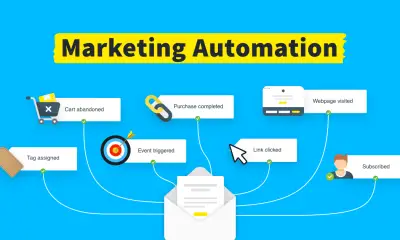

Marketing Automation: A Complete Guide to Smarter Growth
Introduction In today’s digital marketplace, speed, personalization, and efficiency are no longer optional—they are essential. Marketing automation has emerged as...


Do Smart Plugs Use Alot Of Electricity?
In addition to the fact that they are more convenient, smart plugs are intended to help you save money by...


How to Adjust The Temperature On ECOBEE Smart Thermostat?
The Ecobee Smart Thermostat is an advanced piece of equipment that can effectively substitute for your old thermostat. It may...


Top Cheap Gaming Monitors On A Budget
Introduction It is difficult to find a gaming monitor that is affordable and also of great quality. But today the...


Subscriber You Have Dialed is Not in Service
Introduction In today’s fast-paced world, staying in touch with everyone is important. For this purpose, we use our phone to...


What to Do if Spectrum Internet Keeps Dropping, Cutting, Going Out
Introduction It is easy to find the dropping, cutting, going out problem on the Spectrum internet but it can...


How to Sign Into iMessage on iPhone
Introduction In today’s global world, it is necessary to stay in touch with friends, family and colleagues. Apple IMessage service...


The Top 10 Belts for Ab Exercises
You will need to follow a regimented eating plan and training program to get abs like a washboard. However, in...


10 Best Smart Plugs For SAMSUNG Smart Things.
Smart plugs have the potential to have a major effect homes beyond initial expectations. These devices are engineered to enhance...


How To Link An Older Bose Sound System To A Newer Television?
Bose systems are used in the development of high-quality sound systems as well as portable electronic gadgets. Many different Bose...


10 Best Apps To Control All Your Smart Home Devices.
10 Best Apps To Control All Your Smart Home Devices are the kinds of smart home gadgets that used to...


Smartwatch Features: A Comprehensive Overview of Their Capabilities
Trying to choose the perfect smartwatch may be a daunting task, as you’ll want to find one that satisfies your...


Are Smart Locks Hard To Install Find Out Here?
There are several compelling reasons why installing smart locks in a home may be a very worthwhile investment. You won’t...


10 Most Cutting-Edge TVs with Touch Screens
A touch screen TV is a kind of television that can be controlled by touching the screen. This cutting-edge innovation...


How Many Smart Devices Can You Connect To Alexa?
The more gadgets you connect to Alexa, the higher your home’s intelligence will be. Connecting Alexa-enabled smart home devices like...


How To Make Smart Bathroom By Using 5 Gadgets?
The world we live in is completely immersed in advanced technology. Technology makes life simpler in every aspect, from cellular...


Interesting Things About Ecobee Firmware Upgrades.
All smart devices, including smart thermostats, need periodic software upgrades. Firmware is the term used to describe the software that...


What Is Lg Tv Plus And How Its Works And How To Connect To Tv?
When it comes to Smart TVs, LG is a top contender. The two most common brands of televisions are LG...
-

 DIY & Tutorials2 years ago
How to Message on Ashley Madison Without Paying (6 Free Methods 2026)
-
Guides7 months ago
6 Phone Numbers to Call for Music That Still Work (Tested 2026)
-
Guides2 years ago
10 Best Apps To Control All Your Smart Home Devices.
-
 Gadgets3 years ago
Does Nest Thermostats Contain Cameras Or Microphones? Is It Safe For you?
-

 Gadgets3 years ago
What Is The Purpose Of Red Button On The SimpliSafe Keypad?
-

 Gadgets3 years ago
Complete Guide About Equalizer settings for Samsung-Soundbar
-

 Accessories3 years ago
Can Siri Control Samsung Televisions And Are Samsung TVs Homekit Compliant?
-
Gadgets3 years ago
What Is Lg Tv Plus And How Its Works And How To Connect To Tv?