
Guides
How to Build an Integrated Smart Home Security System for Any Home?

Smart home security isn’t about stacking gadgets. It’s about designing a simple, layered system that deters intruders, detects problems quickly, documents what happened, and keeps working when your internet goes down. Whether you rent a studio or own a multi-story house, the process is the same: protect the perimeter, secure the interior, harden the network, and tie everything together with automations you can trust.
This guide walks you through the exact steps, the gear categories that matter, where to put devices, how to handle monitoring and permits, and the gotchas that cause most DIY systems to fail.
1. Start with a quick risk map
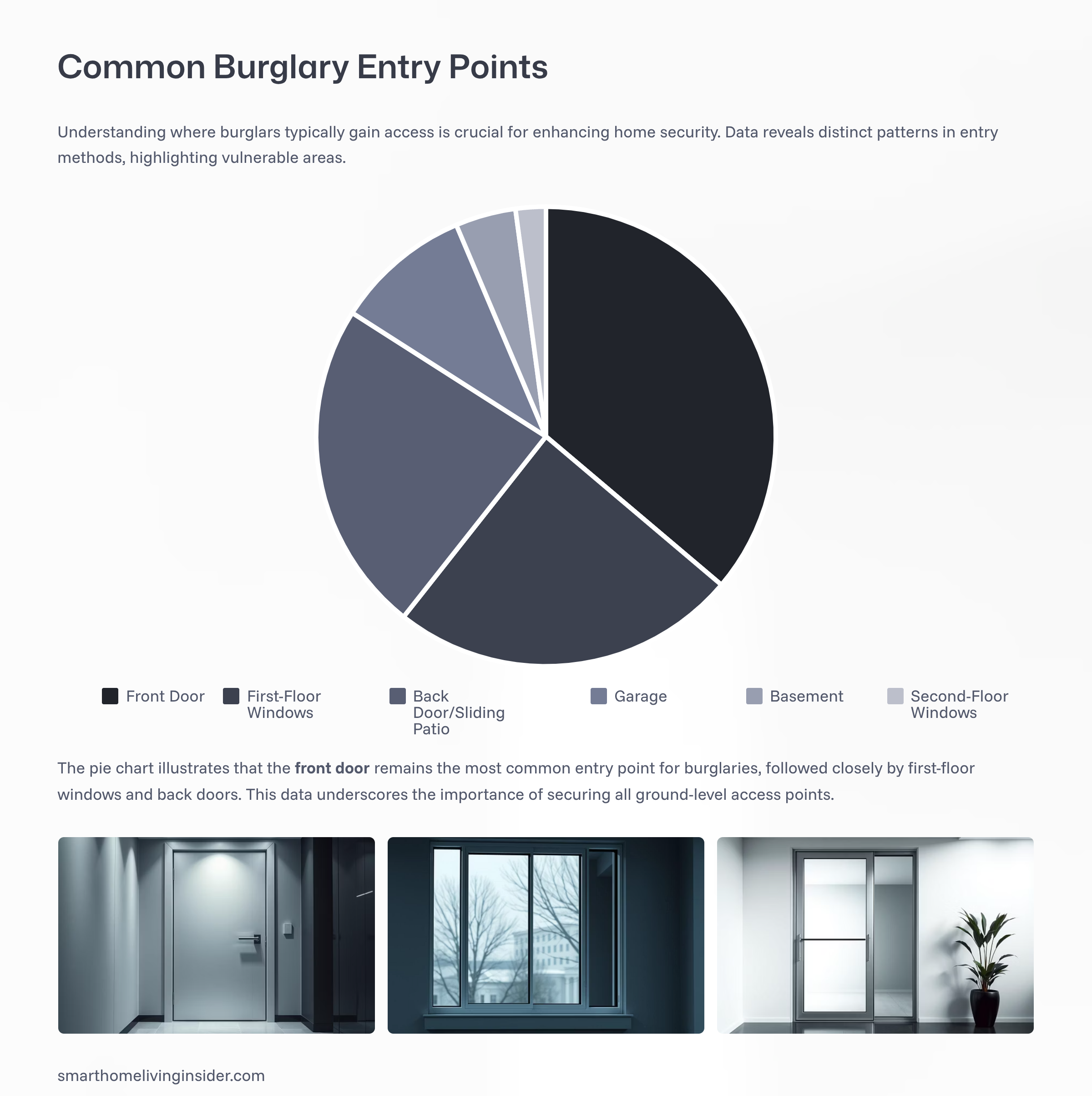
Most burglars enter through the front door (34%), followed by first-floor windows (23%) and back doors (22%), making these the most critical access points to secure (ADT, Reolink, MoneyGeek).
Before buying anything, answer three questions:
-
What are your likely threats?
-
Opportunistic break-ins through doors and first-floor windows
-
Package theft
-
Vandalism in the driveway/yard
-
Water leaks, smoke/CO incidents, or unauthorized access while you’re away
-
-
What do you need to see or prove later?
-
Clear faces at the front door
-
Plates/vehicles in the driveway
-
Movement through a main hallway
-
Timestamps of doors opening, locks changing state, and alarms arming/disarming
-
-
What constraints do you have?
-
Renting (no drilling, no NVR in a closet)
-
Limited outlets or no ethernet on exterior walls
-
Patchy Wi-Fi outdoors
-
Neighbors’ privacy or HOA rules
-
This quick map dictates camera placement, sensor count, networking, and how simple or advanced your automations should be.
2. Pick your control layer (hub/ecosystem) the right way
You need one “brain” to unify sensors, locks, sirens, lights, and cameras. Popular options:
-
Apple Home (Home app + HomePod/Apple TV): privacy-forward, excellent door lock and sensor support, HomeKit Secure Video for supported cameras.
-
Google Home / Alexa: wide device support and routines, strong voice control.
-
SmartThings: broad compatibility with Zigbee/Thread/Matter and many cloud integrations.
-
Home Assistant or Hubitat (local-first): deep customization, local automations, broad protocol support, great for power users. Home Assistant even includes a Manual Alarm Control Panel so you can build a full alarm workflow without a vendor subscription. Home Assistant
A note on Matter, Thread, and cameras
Matter (the new, cross-brand standard) is real and getting better, especially for sensors, locks, plugs, and water valves. But as of 2025, Matter still doesn’t natively support security cameras or video doorbells, so you’ll rely on platform-specific integrations (e.g., HomeKit Secure Video) or use local RTSP/ONVIF with NVRs and software like Home Assistant. WIRED
Matter’s promise—interoperability, local control, and better security—still makes it a smart bet for contact sensors, motion sensors, locks, and water shutoff valves. CSA-IOT
Decision rule: choose the ecosystem that already runs on your phone and smart speakers. If you want maximum control and local automations, add Home Assistant alongside your main ecosystem; it can bridge many devices and lets you keep more functions working even when the internet is down. See Home Assistant’s security hardening guidance before exposing it remotely. Home Assistant
How Burglars Break In (Data Report & Chart)
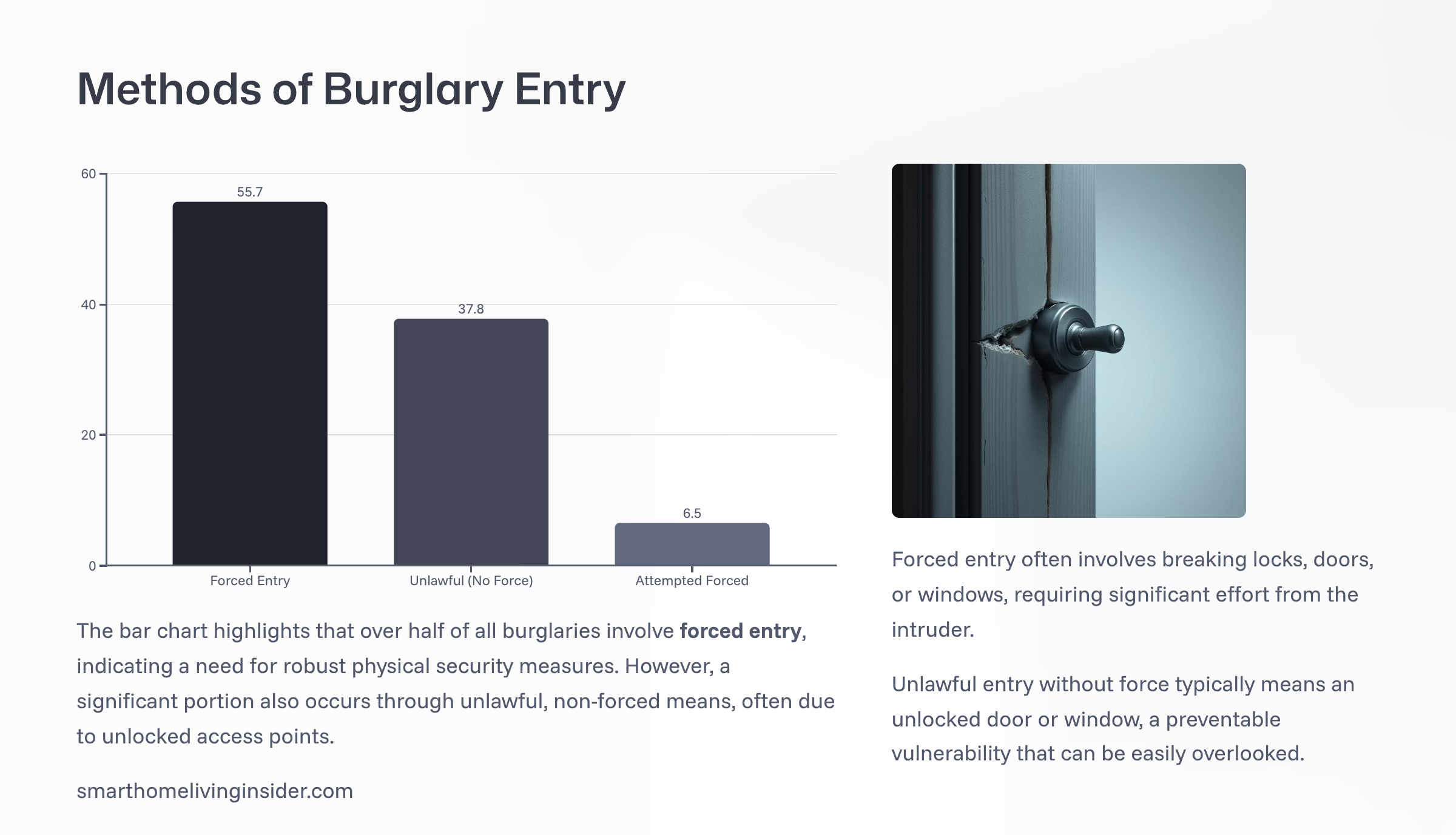
Over half of all burglaries involve forced entry (55.7%), but 37.8% occur through unlocked doors or windows, underscoring the importance of strong locks and secured access (FBI UCR)
3. Build a layered architecture (what to install—and where)
Once your hub is in place, begin adding smart devices that enhance security and awareness. Smart locks allow you to control access remotely and grant temporary permissions to guests or service providers.
Doorbell cameras provide a live view of visitors and can record interactions. Motion sensors and glass break detectors add another layer of protection by alerting you to unusual activity. One of the most valuable additions is a security camera system, which offers continuous surveillance and can be accessed from anywhere.
These systems often include features like night vision, two-way audio, and cloud storage, making it easier to monitor your property and respond to incidents.
You’ll get the best results by combining a few core layers:
Layer A — Perimeter awareness (deterrence + detection)
-
Video doorbell at 8–10 ft high to capture faces and packages without blinding glare. Tom’s Guide
-
Front door, back/side doors, and first-floor windows covered by cameras or sensors (contact + motion). Intruders target the same entries you use, so give these the highest priority. Security.org
-
Driveway/garage coverage to catch approaches and vehicles. Mount cameras to see faces and—if your laws allow—plates, while avoiding neighbors’ private windows. Tom’s Guide
-
Visible deterrents: motion lights and a small sign noting cameras/monitoring reduce attempts before they start.
Camera placement basics: cover entries first (front, back, side), main hallway/stair inside, and driveway. Mount ~8–10 ft high, avoid aiming directly into the sun or bright windows, and prune vegetation that blocks views. Tom’s Guide
Layer B — Interior awareness (failsafe if perimeter is bypassed)
-
Main hallway or stair camera (not bedrooms/bathrooms—privacy matters). Security.org
-
Motion sensors in connecting areas (hallway, living room) to trigger sirens and lights.
-
Siren that can be automated when the alarm is tripped (both indoor and a tempered outdoor siren if local laws allow).
Layer C — Life safety and property sensors
-
Smoke and CO detectors (stick with reputable brands; where integrated control units are used, UL 985/UL 1023 certification is the benchmark for fire/burglar systems). UL Standards ShopIntertek
-
Water leak sensors + smart water shutoff valve at washing machine, water heater, sinks.
-
Garage door tilt sensor to auto-close at night or notify when left open.
Layer D — Access control and lighting
-
Smart locks with per-user codes (no sharing logins).
-
Pathway and exterior lighting on schedules and motion; tie them to camera motion after dark.
4. Choose the right transport (Wi-Fi, Thread, Zigbee, Z-Wave, PoE)
-
Wi-Fi is ubiquitous and perfect for doorbells and many cameras, but don’t flood a cheap router with 30 devices.
-
Thread is a mesh protocol designed for low-power sensors and locks; it works well under Matter.
-
Zigbee/Z-Wave remain solid in many alarms and sensors; many hubs bridge them into your ecosystem.
-
PoE (Power over Ethernet) for stationary cameras: one cable powers the camera and carries data to your NVR/switch; it’s stable and avoids Wi-Fi congestion.
Simple rule:
-
Cameras = PoE where possible; Wi-Fi only where you must.
-
Sensors/locks = Thread or Zigbee (lower power, better battery life).
-
Keep cameras and NVRs on ethernet whenever feasible.
5. Nail the network (where most security builds fall apart)
Great cameras and sensors won’t save you if your network is weak. Use the same baseline that government and security pros recommend for home networks:
-
Segment your Wi-Fi into at least three networks: primary (laptops/phones), guest, and IoT. This limits what a compromised smart device can reach. U.S. Department of Defense
-
Change default passwords and admin ports. Default credentials are the single biggest IoT risk. CISA
-
Update firmware and router OS on a schedule; disable unnecessary services; avoid UPnP unless you truly need it. CISA
-
Use a firewall and avoid exposing devices directly to the internet. If you must access your system remotely, use a VPN or a secure cloud relay you trust. U.S. Department of Defense
-
Harden your controller (e.g., Home Assistant) following its security guide: strong secrets management, SSH keys, and no open inbound ports without reason. Home Assistant
How Fast a Burglary Happens (Data Report)
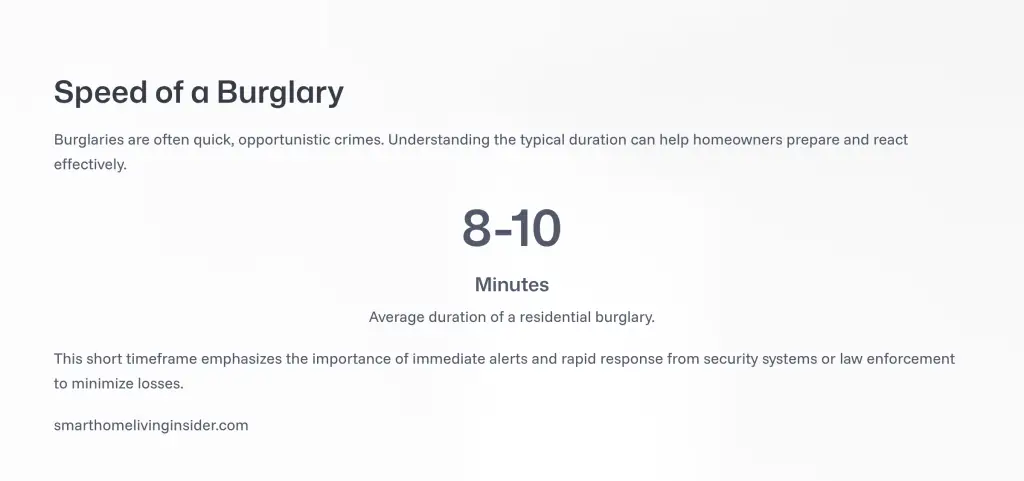
The average burglary takes just 8–10 minutes, emphasizing the need for immediate alerts, rapid response, and proactive deterrence (FBI, Reolink)
6. Pick between local, cloud, or hybrid video
-
Local (NVR, NAS, or Home Assistant) gives you control and no monthly storage fees. Look for RTSP/ONVIF-compatible cameras and wired ethernet if possible.
-
Cloud is simpler to set up and includes easy sharing and AI detection, but it can mean monthly fees and connectivity dependency.
-
Hybrid (local recording + cloud alerts) is often ideal: you keep 24/7 footage locally but still get mobile alerts and AI events.
Because Matter doesn’t cover cameras yet, your best path is either HomeKit Secure Video, vendor cloud apps, or a local NVR stack. WIRED
Why Visible Security Systems Work (Data Insights)
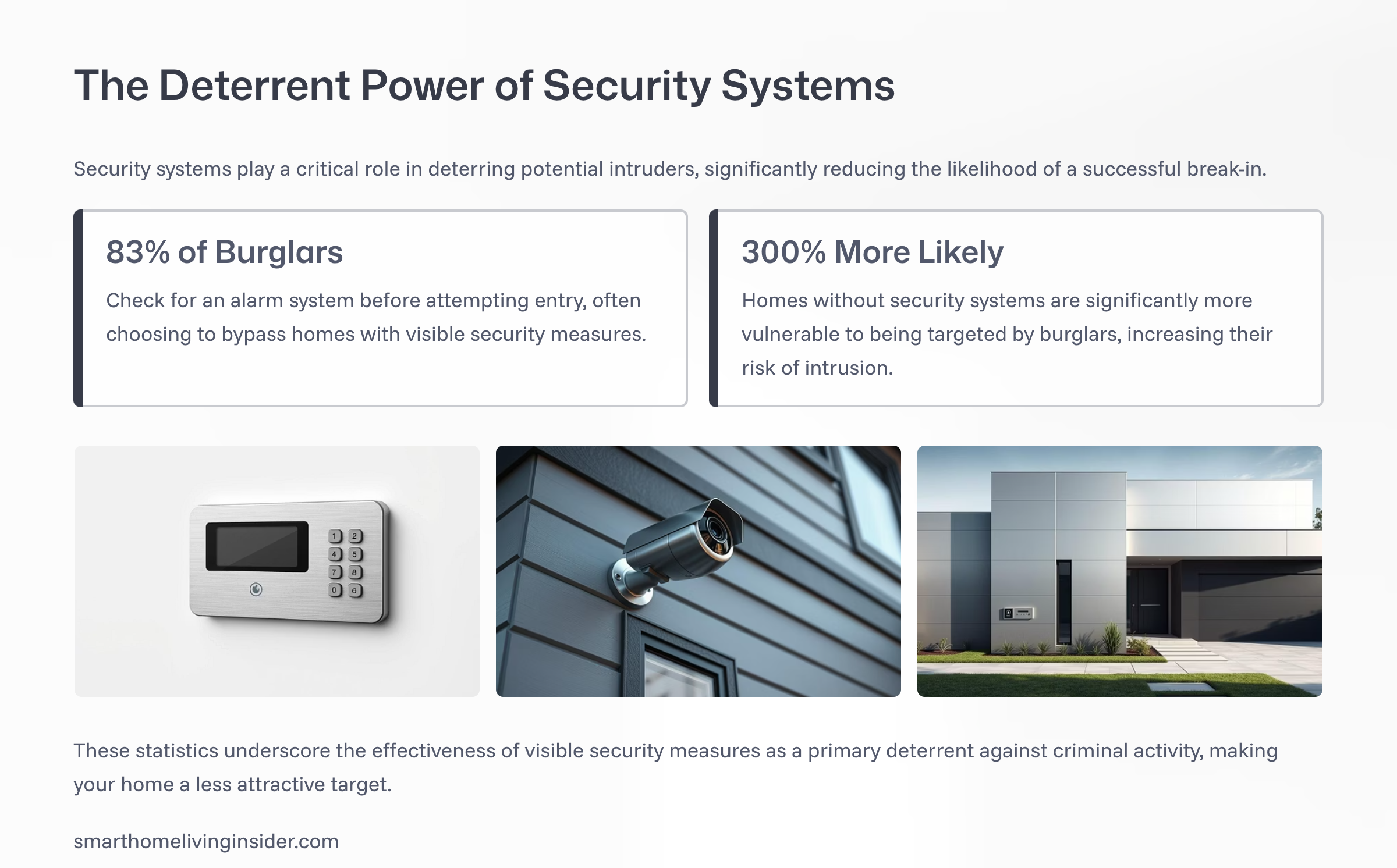
Visible security systems deter intruders: 83% of burglars check for alarms first, and homes without security are 3× more likely to be targeted (FBI via The Zebra, Alarm.org)
Visible security systems deter intruders: 83% of burglars check for alarms first, and homes without security are 3× more likely to be targeted (FBI via The Zebra, Alarm.org)
7. Monitoring: self, professional, or both?
-
Self-monitoring: you get notifications and decide when to call for help. It’s cheap, but you could miss alerts while in a meeting or on a flight.
-
Professional monitoring: a central station contacts you and dispatches responders when needed. In many jurisdictions, a permit is required for professionally monitored systems, and false alarms can carry fines. Check your city’s rules before you enable pro monitoring. RingADT HelpSecurity.org
Tip: even if you start self-monitored, learn your local alarm-permit rules so you don’t get penalized if a neighbor calls police during a siren event. Evansville Police Department
8. Power and resilience (make it work when the power blinks)
-
UPS (battery backup) for your modem, router/switch, hub/controller, and cameras/NVR.
-
Cellular backup if you rely on professional monitoring or need alerts during internet outages.
-
Local automations for core security (arming/disarming, siren triggers, lighting on motion) so they still work without cloud access.
9. Exact device placement (field-tested patterns)
Use these placements to cover 95% of common homes:
Outside
-
Doorbell at 8–10 ft.
-
Front approach camera angled to catch faces walking up (avoid pointing at street glare).
-
Garage/driveway camera set to see vehicles entering and people approaching side doors.
-
Rear/side doors covered with a second camera or at least a motion light + contact sensor.
-
Avoid bedrooms/bathrooms and never aim into neighbors’ private spaces; use privacy zones. Tom’s Guide
Inside
-
Main hallway/stair camera to record movement between rooms (if you use indoor cameras).
-
Contact sensors on all exterior doors + first-floor windows.
-
Motion sensors in connecting spaces to trigger sirens/lights when armed.
Why this works: If someone bypasses an exterior camera, the hallway/stair camera is your last line: it records anyone moving deeper into the home. The doorbell gives the best face shots and package proof. The driveway shows vehicles and direction of travel.
For camera placement fundamentals and priority locations, see independent guides emphasizing doors, back/side entries, driveways/garages, main hallways, correct height, and avoiding glare. Security.orgTom’s Guide
10. Automations that actually add security (not just “smart” fluff)
Automations should reduce risk, not create noise. Keep them short, explainable, and testable.
-
Arming scenes you’ll use
-
Home: perimeter sensors notify but no siren; interior motion disabled.
-
Away: all sensors armed; motion triggers siren.
-
Night: perimeter armed; indoor motion only in downstairs zones.
-
-
Lighting as deterrent
-
At sunset, enable “motion → porch light for 3 minutes” and “driveway motion → garage sconces + camera snapshot”.
-
If alarm = tripped, turn on interior lights in a path from entry to exit.
-
-
Lock discipline
-
If door unlocked after 10 pm, send alert and re-lock after 2 minutes unless presence = true.
-
Assign per-user PINs for guests and cleaners; alerts on first use.
-
-
Life safety
-
If water sensor = wet, close the smart shutoff valve and text a photo of the leak location card taped nearby.
-
If smoke detected, unlock smart locks and turn on hallway lights.
-
-
Privacy rules
-
Automatically disable indoor cameras when you’re home, and re-enable when away.
-
11. A renter-friendly kit vs. a homeowner kit (modular bill of materials)
Renter-friendly (no drilling or rewiring)
-
Video doorbell with a wedge mount or a no-drill mount
-
Wi-Fi cameras for front approach and a single interior hallway (if acceptable)
-
Contact sensors on doors + a couple of key windows
-
Motion sensor in living area
-
Smart lock with keypad (keep the original lock for move-out)
-
Plug-in siren and a small UPS for router + hub
-
Cloud recording or a tiny local recorder you can take with you
Homeowner (more permanent, more resilient)
-
PoE doorbell and PoE exterior cameras to an NVR or NAS
-
Hard-wired motion lights and a 100–200W PoE switch on a UPS
-
Thread/Zigbee contact and motion sensors for low battery drain
-
Whole-home leak sensors + motorized water shutoff
-
Smoke/CO network tied into your system; where applicable, align with fire/burglar standards (UL 985/UL 1023 equipment). UL Standards Shop
12. Privacy, compliance, and being a good neighbor
-
Get consent where required and avoid filming into neighbors’ windows or private spaces; use privacy zones and face-blur where available.
-
Tell household members how cameras and mics work, and create “no camera” spaces.
-
Know your city’s alarm permit rules if you enable professional monitoring. Fines for false alarms are common, and many places require registration. RingSecurity.org
13. A weekend build plan (you can copy this)
Friday night
-
Map your entries and walkways; mark camera fields of view on paper.
-
Create three Wi-Fi networks: Primary, Guest, IoT. Change default router/admin passwords. U.S. Department of DefenseCISA
Saturday
-
Mount doorbell and exterior cameras (8–10 ft). Aim, test at night, tune motion zones. Tom’s Guide
-
Install contact/motion sensors.
-
Set up your hub/controller; create Home, Away, and Night security modes.
Sunday
-
Add smart locks and lighting automations for dusk-to-dawn and motion.
-
Set up notifications that are specific (which door, which camera, with snapshot).
-
Document your system: where devices are, how to reboot, how to silence a false alarm.
-
If you’ll use pro monitoring, file the alarm permit now. Ring
14. Troubleshooting the problems that sink most DIY builds
-
Too many false alerts: reduce motion sensitivity, use “people-only” detection, narrow activity zones, and avoid branches/flags in the frame.
-
Wi-Fi congestion: move cameras to ethernet/PoE or put them on the IoT SSID.
-
Night glare and blown-out faces: lower the camera a bit, shift the angle, and add a small warm-white flood light to balance exposure. Tom’s Guide
-
Missed recordings: increase pre-buffer/recording length; for battery cams, consider wired power where feasible.
-
Automation loops: set quiet hours and “don’t re-trigger within X minutes” conditions.
The Hidden Risk: Unlocked Doors and Windows (Data Insights)
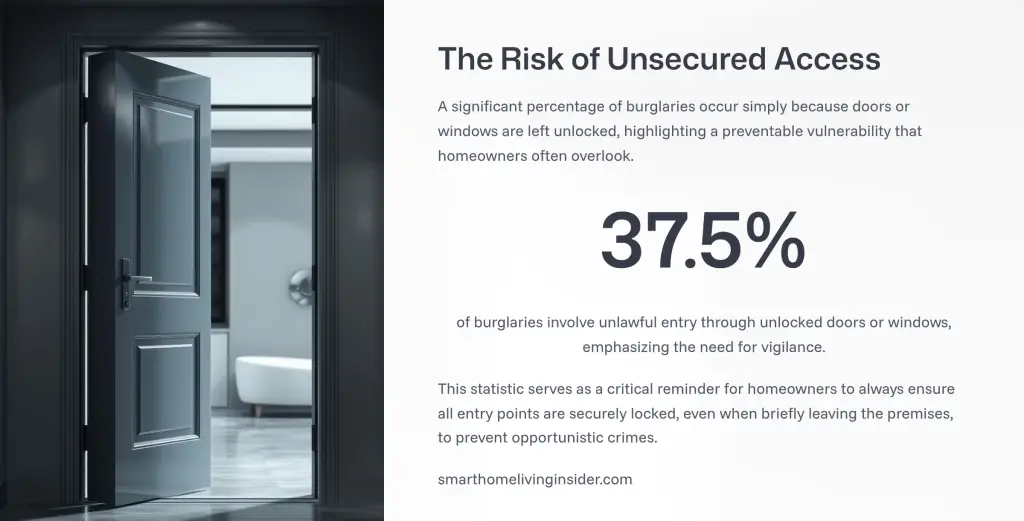
More than a third of burglaries (37.5%) happen through unlocked doors or windows, a simple vulnerability homeowners can easily prevent (Deep Sentinel)
15. FAQs
Do I need a smart hub?
Not always. If you only want a doorbell and one camera, you can run vendor apps. But once you add locks, sensors, and lighting, a unified controller makes automations reliable and keeps more logic local.
Can I future-proof with Matter?
Matter is great for sensors/locks and runs locally over Thread/Wi-Fi. It still doesn’t include cameras or doorbells, so plan for a separate path there (HomeKit Secure Video, vendor cloud, or local NVR). WIRED
What about professional monitoring?
If you enable it, many cities require an alarm permit, and fines can apply for false alarms. Check your city’s rules before switching it on. RingSecurity.org
How should I place cameras for best coverage?
Cover the front door, back/side doors, driveway/garage, and a central indoor path. Mount 8–10 ft high and avoid direct sun and reflective glare. Tom’s Guide
16. The minimalist shopping list (by role, not brand)
-
Doorbell camera (wired if possible)
-
2–4 exterior cameras (PoE preferred)
-
Contact sensors for every exterior door + first-floor windows
-
1–2 interior motion sensors
-
Smart lock with keypad
-
Interior siren (and outdoor siren if allowed)
-
Water leak sensors + optional auto shutoff valve
-
Smoke/CO detectors (with integration path or separate, standards-listed equipment) UL Standards Shop
-
Hub/controller (Apple/Google/Alexa/SmartThings/Home Assistant)
-
Small UPS for modem, router/switch, hub, and NVR
17. Final take
An integrated smart home security system isn’t about gear count—it’s about disciplined design:
-
Perimeter first, interior second
-
Solid networking and segmentation
-
Cameras where faces and movement are guaranteed
-
Short, reliable automations that reduce noise
-
Clear plan for recording, power backup, and (if you want it) monitoring
Follow that blueprint and you’ll have a system that deters most attempts, documents what matters, and keeps running when the cloud doesn’t. That’s real security.
Conclusion
Building an integrated smart home security system isn’t about piling on gadgets. It’s about layered protection, resilient networking, and smart automation.
By covering your perimeter first, backing it with interior motion/sensors, hardening your network, and planning for local resilience, you create a system that deters intruders, documents incidents, and works even when the cloud doesn’t.
Whether you live in a small apartment or a large house, the same blueprint applies. Start with risk mapping, build layer by layer, and choose devices that fit your lifestyle. Done right, your home security becomes invisible until you need it and invaluable when you do.
Frequently Asked Questions
Q1. Do I need a hub for smart home security?
Not always. A few cameras and a doorbell can run on vendor apps. But if you add sensors, locks, and automations, a hub (HomeKit, SmartThings, Home Assistant) makes your system more reliable.
Q2. Can I build a security system in a rental?
Yes. Use Wi-Fi doorbells, plug-in cameras, wireless sensors, and smart locks with removable mounts. They’re easy to take with you when moving.
Q3. Does Matter support security cameras yet?
No. As of 2025, Matter supports sensors, locks, and plugs but not cameras. For video, use HomeKit Secure Video, vendor clouds, or a local NVR.
Q4. Do I need an alarm permit?
If you use professional monitoring, many cities require an alarm permit. Fines can apply for false alarms if you don’t register.
Q5. What’s the best camera placement?
Front door (faces), back/side doors (entry points), driveway/garage (approaches), and one central hallway/stair inside. Mount cameras at 8–10 feet to avoid glare and get clear angles.
Q6. Should I choose local or cloud storage for cameras?
Local (NVR/NAS) means no fees and full control. Cloud offers AI detection and easy sharing. Hybrid (local + cloud alerts) gives the best balance.
Q7. How do I stop false alarms?
Adjust motion sensitivity, set person-only zones, prune trees/branches in view, and use dual triggers (motion + contact sensor).



Homeowner’s Guide: Practical Tips for Preventing Costly Roof Damage
A home’s roof often sits out of sight and out of mind, so trouble tends to build quietly. Signs appear...


How to Spruce Up Your Home’s Exterior Before Decorating it?
Holiday decorating is always more fun when the stage is set, and nothing sets that stage better than a refreshed...


When Preparedness Becomes a Homeowner’s Best Asset?
What do you do when something at home breaks at the worst possible time? Maybe it’s a leaky roof during...


From Repairs to Renovations: How to Keep Your Home in Top Shape?
Keeping a place in great shape requires attention, time, and smart planning. Small fixes often grow into bigger projects if...


The Most Overlooked Structural Issues in Older Homes
Older homes often carry a charm that newer properties cannot replicate. They offer character, history, and distinctive design. Yet many...


More Than a Change of Address: How to Feel at Home in a New City
Ever unpacked a box of dishes and suddenly felt like a stranger in your own life? It happens. You move...


The Steps That Make Transitioning Into a New Home More Manageable
Moving into a new home feels exciting, yet many people find the process stressful when tasks pile up unexpectedly. A...


How to Tell If Your Water Heater Is Costing You More Than It Should?
If you live in St. Charles, you’ve probably seen your utility bills rise over the past few seasons — even...


Small Space Styling Ideas Featuring the Globule Gold Leafing Console
Small interiors demand furnishings that deliver both style and function without overwhelming the room. The Globule Gold Leafing Console offers...


Budget-Friendly Ways to Modernize an Older Home
If you live in Boulder, you probably know how charming older homes can be. Many of them have character, personality,...


From Cleanup to Care: A Homeowner’s Guide to Storm Recover
Storms can leave families dealing with damaged walls, soaked flooring, and scattered debris. In Northeast Georgia, where strong weather can...

What Are Design Trends That Elevate Homes from Ordinary to Exceptional?
Ever walked into a home that just felt special? It might have been the layout, the lighting, or even the...


Can’t Beat the Chill at Home? Here’s What Might Be Going Wrong
When winter sets in, it often exposes problems in your home you might not have noticed during the warmer months....


Energy-Efficient Home Improvement Projects That Cut Bills
Ever looked at your electric bill in Pennsylvania during winter and thought, “Did I start heating the neighborhood by mistake?”...


Just Moved In? Here’s How to Make Your Home Winter-Ready
Moving into a new home brings a sense of accomplishment, boxes are unpacked, furniture is in place, and the space...


How Coastal Homes Stay Reliable Year After Year?
Coastal homes capture a kind of beauty that few other places can match. Waking up to the sound of waves,...


Your Complete Seasonal Home Tune-Up Checklist: What to Do Every 6 Months?
Seasons come and go, and your home works hard to keep up with the changes. From running your air conditioning...


Understanding Plumbing Inspection Cost and Why It is Worth It?
When you move into a new house or start seeing strange plumbing issues one of the first things you may...

Why Choosing a Local Oahu Appliance Repair Expert Matters for Your Home?
Life in Hawaii offers a rhythm unlike anywhere else — warm breezes, ocean views, and the comfort of island living....


Inside, Outside, All Around: Property Upgrades and Repairs That Keep Homes Thriving
Keeping a place thriving isn’t only about what’s seen at first glance. It’s about long-term comfort and steady upkeep. In...

Energy-Efficient Roofing Solutions in NJ | Yukor Construction
When planning a roof replacement, many homeowners think first about appearance and protection from leaks. But in today’s conditions, a...


Preventative HVAC Care: Avoiding Costly Breakdowns Before They Happen
A reliable HVAC system is essential for maintaining comfort, air quality, and energy efficiency throughout the year. Yet, many property...


If I Unblock Someone on iMessage, What Happens?
In today’s global world, it is necessary to stay in touch with friends, family and colleagues. Apple IMessage service is...


How Smart Pool Cleaners Integrate with Home Automation Systems?
In today’s smart home world, the robot pool cleaner is no longer a utility device but rather is now a smart,...

What Causes an Electric Motor to Hum and not work
One of the most common machines is those that are powered by electric motors. At times, however, these motors can...


How to Find Your Verizon Account Number
Introduction So Verizon is a popular messaging service and calling app that provides the option of free call and phone...


How to Delete Read-Only Contacts: Android & iphone
Introduction It is simple to delete read-only contacts on the Android and iPhone but a question arises here: how can...


How to Find Saved Videos on My Phone
Introduction Nowadays the integral part of our life is the mobile phone. We create so many memories everyday and store...

You Can’t Message This Account: Messenger Fixed
Introduction Facebook messenger is one of the most popular messaging apps globally to connect with other people throughout the world....


Delete Text Messages on iPhone for Both Sides
Introduction It is simple to delete messages on the iPhone but a question arises here: how can we delete messages...


Why Won’t My Call Go Through to a Certain Number?
Introduction In today’s fast-paced world, staying in touch with everyone is important. For this purpose, we use our phone to...


Call Ends Immediately After Dialing on Android
Introduction In today’s fast-paced world, staying in touch with everyone is important. For this purpose, we use our phone to...


What Is Logitech Download Assistant?
Logitech is famous throughout the world for their amazing computer accessories including mouse, keyboard and headsets. These devices come with...


Does a Canceled Call Go Through on iPhones?
Introduction In today’s digital world there are new and exceptional ways for connecting with each other. Communication has also evolved...


How to Create an INI File on Windows, Mac, Android
Introduction The files that are used to store settings and configuration for the software application are known as INI files....


How Long Do AirPods Take to Charge from Dead?
Airpods Pro are one of the best and most popular airbords that are wireless and available in the market nowadays....


PS4 Controller Charging but Not Connecting
Introduction Many people play PS4 games nowadays but sometimes they encounter a frustrating issue which is that their controller is...


How to Fix IMS Registration Status Not Registered
Introduction IMS stands for IP multimedia system which is present in carrier rn smartphones that play a crucial role in...


Rythm Discord Bot: What It Is and How to Use It
Introduction Discord has been extremely popular nowadays aur communication among gamers technicians and other communities that want to stay connected...


Where Is the Volume Button on a Vizio TV
Introduction It is easy to find the volume button on the Vizio TV but it can be difficult for a...


Smart Travel Hacks by CWBiancaVoyage: Your Ultimate Guide
Introduction Traveling can be both exhilarating and overwhelming. Whether you’re a seasoned globetrotter or a first-time explorer, the journey often...


Call Error: “The Number You Are Trying to Call Is Not
Introduction Few things are more frustrating than dialing a number only to hear the automated message: “The number you are...


Marketing Automation: A Complete Guide to Smarter Growth
Introduction In today’s digital marketplace, speed, personalization, and efficiency are no longer optional—they are essential. Marketing automation has emerged as...

Do Smart Plugs Use Alot Of Electricity?
In addition to the fact that they are more convenient, smart plugs are intended to help you save money by...


How to Adjust The Temperature On ECOBEE Smart Thermostat?
The Ecobee Smart Thermostat is an advanced piece of equipment that can effectively substitute for your old thermostat. It may...


Top Cheap Gaming Monitors On A Budget
Introduction It is difficult to find a gaming monitor that is affordable and also of great quality. But today the...


Subscriber You Have Dialed is Not in Service
Introduction In today’s fast-paced world, staying in touch with everyone is important. For this purpose, we use our phone to...

What to Do if Spectrum Internet Keeps Dropping, Cutting, Going Out
Introduction It is easy to find the dropping, cutting, going out problem on the Spectrum internet but it can...


How to Sign Into iMessage on iPhone
Introduction In today’s global world, it is necessary to stay in touch with friends, family and colleagues. Apple IMessage service...


The Top 10 Belts for Ab Exercises
You will need to follow a regimented eating plan and training program to get abs like a washboard. However, in...

10 Best Smart Plugs For SAMSUNG Smart Things.
Smart plugs have the potential to have a major effect homes beyond initial expectations. These devices are engineered to enhance...

How To Link An Older Bose Sound System To A Newer Television?
Bose systems are used in the development of high-quality sound systems as well as portable electronic gadgets. Many different Bose...

10 Best Apps To Control All Your Smart Home Devices.
10 Best Apps To Control All Your Smart Home Devices are the kinds of smart home gadgets that used to...


Smartwatch Features: A Comprehensive Overview of Their Capabilities
Trying to choose the perfect smartwatch may be a daunting task, as you’ll want to find one that satisfies your...

Are Smart Locks Hard To Install Find Out Here?
There are several compelling reasons why installing smart locks in a home may be a very worthwhile investment. You won’t...


10 Most Cutting-Edge TVs with Touch Screens
A touch screen TV is a kind of television that can be controlled by touching the screen. This cutting-edge innovation...

How Many Smart Devices Can You Connect To Alexa?
The more gadgets you connect to Alexa, the higher your home’s intelligence will be. Connecting Alexa-enabled smart home devices like...


How To Make Smart Bathroom By Using 5 Gadgets?
The world we live in is completely immersed in advanced technology. Technology makes life simpler in every aspect, from cellular...

Interesting Things About Ecobee Firmware Upgrades.
All smart devices, including smart thermostats, need periodic software upgrades. Firmware is the term used to describe the software that...


What Is Lg Tv Plus And How Its Works And How To Connect To Tv?
When it comes to Smart TVs, LG is a top contender. The two most common brands of televisions are LG...
-
Guides2 years ago
10 Best Apps To Control All Your Smart Home Devices.
-
 Gadgets3 years ago
Does Nest Thermostats Contain Cameras Or Microphones? Is It Safe For you?
-
 Gadgets3 years ago
What Is The Purpose Of Red Button On The SimpliSafe Keypad?
-
 Gadgets3 years ago
Complete Guide About Equalizer settings for Samsung-Soundbar
-
 Accessories2 years ago
Blink Camera’s Temperature Sensor Settings, and More
-

 Accessories2 years ago
Can Siri Control Samsung Televisions And Are Samsung TVs Homekit Compliant?
-

 Gadgets3 years ago
Fitbit Symbols Meaning: What Do The Fitbit Icons Mean?
-

 Solutions3 years ago
Why is My Samsung TV Picture So Dark? Exploring the Possible Causes